My Codex Skills as a Research Scientist
My Codex Skills as a Research Scientist
This repository collects the Codex skills I have used regularly since January 2026 in my work as an AI/ML scientist in Oracle. Each skill is designed around a specific recurring workflow where a small amount of prompt structure can make an AI agent much more useful.
For example, thread-learning-log helps me capture what I learned from a session so that daily work turns into reusable knowledge, more importantly, encourage me to learn something new each day. grill-me helps pressure-test a plan or design by surfacing hidden assumptions, unresolved decisions, and likely limitations before implementation begins.
Link to the Github repository: https://github.com/tuananhbui89/skills
Skills Map
| Skill | Use it when |
|---|---|
thread-learning-log |
Turn the current Codex thread into a durable learning-log entry after confirmation. |
grill-me |
Pressure-test a plan, proposal, or architecture through a decision-by-decision interview. |
ask-me-paper |
Test and deepen your understanding of a paper or article with one rigorous question at a time. |
tough-review |
Review an ML/AI paper for critical weaknesses, including its appendix, one concern at a time. |
youtube-transcript |
Fetch, save, and summarize a YouTube video’s transcript. |
lecture-noter |
Turn a YouTube lecture into reusable notes with a transcript, structured summary, mind map, representative frames, al-folio Markdown, and HTML. |
lazy-reader |
Create exhaustive, structured reading notes for an arXiv paper, including key evidence and visuals. |
research-blog-writer |
Research and draft a new grounded technical blog post from a topic or outline. |
blog-knowledge-curator |
Turn useful discussions and sources into evidence-backed proposals for improving an existing blog. |
arxiv-tex-crawler |
Download and unpack an arXiv paper’s TeX source, figures, and supporting files. |
illustrator-planner |
Identify and specify the teaching visuals that would improve a document. |
illustrator-drawer |
Create an original accessible SVG from an approved illustration request. |
markdown-to-html |
Convert local Markdown into a self-contained HTML article with rendered math. |
write-as-lil |
Iteratively review an existing technical draft through approval-gated editorial improvements. |
Thread Learning Log
Motivation: I want a lightweight way to track what I actually learn while working with AI agents. Today, agents can support many parts of our work, such as reading papers, planning experiments, writing code, debugging, and running evaluations. As a result, we can accomplish much more in a single day than before.
But in my own experience, moving faster does not always feel the same as understanding more deeply. It can feel like the difference between walking somewhere and riding in a self-driving car. When I walk, progress is slower and I may stumble, but the obstacles I encounter force me to observe, reason, and solve problems myself. Knowledge is formed through that friction, and it tends to stay in my mind. In a self-driving car, I may travel much farther, but I can lose the embodied sense that I actually learned the route.
There is also a more personal reason: my memory is not especially reliable. If I do not revisit something, I often forget the details after a while. This is consistent with the idea of the “forgetting curve”: without review or reinforcement, knowledge fades over time.
The idea behind this skill is simple: ask an AI agent to review the session or thread we just worked through together and extract durable, reusable lessons that may be useful in the future. For example, after using Codex to read and discuss a research paper, I can ask it to capture the paper’s main ideas, assumptions, and takeaways. Or, after solving a difficult bug, I can ask the skill to summarize the debugging path, the root cause, and the fix.
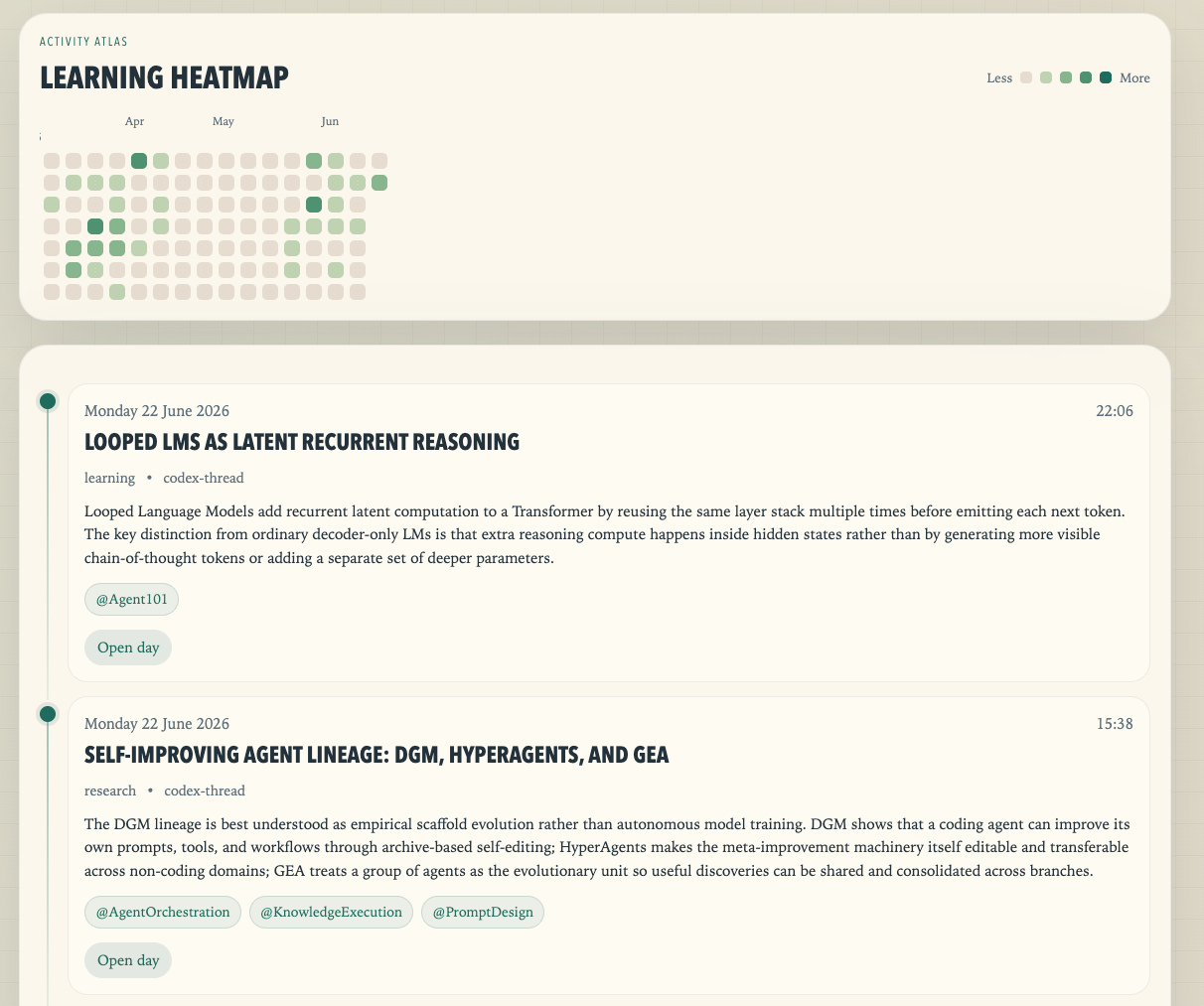
The memory file will be a Markdown document. Each item or section represents one lesson, tagged with a timestamp and the related project or topic.
To make the skill more useful, visible, and easy to revisit, I also want Codex to build a small website from the main memory Markdown file. The UI should look like the image below, inspired by GitHub’s commit history. Seeing a daily record of what I have learned and solved should make it easier to return to the log regularly and encourage me to save at least one interesting lesson each day.
Grill Me
Matt Pocock’s grilling skill is a small but powerful example of prompt design. I tried it and found it surprisingly useful, not because the prompt is long or complex, but because it gives the model a clear conversational role: slow the user down, pressure-test the plan, and expose hidden assumptions before implementation begins.
That experience changed how I think about skills. A good skill does not always need a large knowledge base, a complicated toolchain, or many pages of instructions. Sometimes a few carefully chosen sentences are enough to unlock much better behavior from an LLM.
The skill
Below is Matt’s original grilling skill, which is the starting point for my local grill-me skill:
---
name: grilling
description: Grill the user relentlessly about a plan or design. Use when the user wants to stress-test a plan before building, or uses any 'grill' trigger phrases.
---

Interview me relentlessly about every aspect of this plan until we reach a shared understanding. Walk down each branch of the design tree, resolving dependencies between decisions one-by-one. For each question, provide your recommended answer.

Ask the questions one at a time, waiting for feedback on each question before continuing. Asking multiple questions at once is bewildering.

If a question can be answered by exploring the codebase, explore the codebase instead.

Do not enact the plan until I confirm we have reached a shared understanding.
I modified the skill slightly with Codex, but the core principles remain the same:
- Interview relentlessly, but ask only one question at a time.
- Provide a recommended answer for each question so the user has something concrete to accept, reject, or revise.
- Walk down each branch of the design tree, resolving dependencies between decisions one by one.
- Explore the codebase directly when a question can be answered from local context.
The phrase “walk down each branch of the design tree” feels especially important. It tells the model not to ask random clarification questions, but to treat the plan as a structured set of dependent decisions. Each answer either opens or closes later branches. This is what makes the skill feel closer to a serious architecture review than a normal back-and-forth chat.
Usage
Use this skill to stress-test a plan, design, architecture, research direction, or implementation strategy before committing to it. It is especially useful when the problem has unclear requirements, hidden tradeoffs, or decisions that depend on one another.
Its behavior feels related to Plan mode in Codex: both ask clarifying questions and often provide recommended answers. The difference is intensity and depth. Plan mode usually asks only a small number of questions before moving toward execution. grill-me can keep going for much longer, which makes it better for uncovering unknown-yet-important details. I have often been surprised by the questions it raises, because they reveal assumptions I did not realize were part of the plan.
Ask Me Paper
This skill was inspired by grill-me, but adapts the same interview-driven pattern to one of my most important workflows: reading academic papers and technical articles.
One reading principle I try to follow is active hypothesis testing:
- Before reading, and while reading, I form hypotheses and questions about the problem setting, assumptions, method, evidence, and limitations.
- Reading becomes the process of looking for answers to those hypotheses and questions.
- I should stop only when I can make a clear judgment: the paper addresses the question, the paper does not address it, or the answer remains uncertain.
This skill tries to recreate that discipline with Codex. Instead of letting me passively read a summary, Codex first reads the supplied paper or article, builds an internal understanding map, and then interviews me with rigorous four-choice multiple-choice questions. The goal is not to collect trivia from the paper. The goal is to check whether I understand the paper’s central argument, how its claims depend on its evidence, what assumptions the method makes, and where the limitations are.
The skill
The core behavior of ask-me-paper is:
- Read the supplied paper or article before asking questions.
- Stay grounded in the source unless I explicitly ask for external context.
- Build an understanding map covering the thesis, claims, evidence, methods, definitions, assumptions, limitations, implications, and open questions.
- Ask exactly one multiple-choice question at a time, with four options labeled
A.toD.. - Make the distractors plausible and diagnostic, so wrong answers reveal specific misunderstandings rather than random mistakes.
- After each answer, classify it as correct, partial, unsupported, or wrong.
- Correct misunderstandings with concise evidence from the source before moving on.
- Continue until the main concepts have been tested or I ask to pause.
This is important because good paper reading is not just “Can I repeat the abstract?” It is closer to “Can I distinguish the paper’s actual claim from a tempting stronger claim? Can I explain why the method is appropriate? Can I see what the evidence does and does not prove?” Multiple-choice questions are useful here because they force commitment. I cannot hide behind vague familiarity; I have to pick an interpretation.
Usage
Use this skill when I have a paper, article, PDF, excerpt, or pasted text and want to test whether I really understand it. A typical prompt is:
Use $ask-me-paper on this paper and quiz me one question at a time.
It is useful in several moments:
- before a deep read, to surface what the paper is probably about and what I should pay attention to
- after a first read, to check whether I understood the main argument
- before a meeting or discussion, to make weak points visible
- when reading a difficult method section, to separate real understanding from recognition of familiar terms
- after using an AI agent to summarize a paper, to make sure I did not only outsource the understanding
The most valuable behavior is correction. If I choose the wrong answer, the skill should not simply reveal the correct option and move on. It should explain the misconception, point back to the paper’s evidence or logic, and ask a targeted follow-up question when the misunderstanding affects later understanding. That turns paper reading into an active loop: commit, get corrected, refine the model, and continue.
Tough Review
Motivation: Before submitting an ML/AI paper, I want to understand where a demanding reviewer could challenge it. A contribution may sound convincing in the introduction while relying on an untested assumption, an incomplete baseline comparison, or evidence that supports a narrower claim. I want a review that reads the method, experiments, and appendix together, then helps me work through the strongest objections.
tough-review applies the interview pattern to paper critique. ask-me-paper helps me understand a paper; tough-review asks whether its claims hold up and what evidence or revision would address a weakness.
The skill
The core behavior of tough-review is:
- Read the full available paper, including appendices and supplements, before raising the first concern. For a local LaTeX project, inspect the section files, figures, tables, and relevant bibliography too.
- Build an internal critique map covering the contribution, assumptions, method, theory, experiments, limitations, and reproducibility. Prioritize threats to the central claim and novelty before smaller presentation issues.
- Check external literature by default when assessing novelty, related work, baselines, or evaluation norms. Prefer primary sources and distinguish the paper’s evidence from external context; mark those judgments as provisional when external context is unavailable.
- Raise exactly one independent concern at a time. Identify where it appears, why it matters, what would fully address it, and one direct question for me to answer.
- Assess each response as resolved, partially resolved, unresolved, or an explicit limitation. Follow up when evidence is missing, and continue until all substantial concerns have been raised or I ask to pause.
The useful part is the revision target attached to each concern. A missing baseline may require an experiment, an unsupported theorem may require a corrected proof, and an overbroad claim may require narrower wording. Adding a limitations sentence is sufficient only when it actually addresses the concern’s severity. When the review stops, the skill summarizes the remaining weaknesses and concrete modifications needed.
Usage
Use $tough-review to review this ML/AI manuscript, including its appendix and supplements. Raise one concern at a time, explain what would fully address it, and wait for my answer: <PDF or LaTeX project path>
This is useful before submission, when revising a draft, or when checking whether a rebuttal answers a reviewer’s objection. Supplying the complete manuscript and supporting material gives the review a stronger basis for judging the work.
YouTube Transcript
I often learn from YouTube tutorials, talks, and walkthroughs, but many of them are long. A useful video can easily be 30 minutes or more, and my attention usually fades very soon. Therefore, it comes very naturally with the need of a co-study partner: extract the transcript, summarize the structure, and help me decide where to spend my attention.
This skill exists for that workflow. It uses a Python helper built around youtube-transcript-api to fetch a transcript from a YouTube URL or video ID, save the transcript in the current workspace, and then produce a concise summary of the video’s content. Having the transcript as a local text file is also useful because it turns a video into something searchable, quotable, and easy to revisit later.
The skill
The core behavior of youtube-transcript is:
- Accept common YouTube URL formats, including normal watch links,
youtu.belinks, Shorts, embeds, live URLs, and playlist URLs that contain a video parameter. - Fetch the transcript through
scripts/get_transcript.py. - Save the transcript as a
.txtfile in the current workspace unless another destination is requested. - Report useful metadata, including the output path, video ID, transcript language, whether it was auto-generated, and any fallback behavior.
- Read the saved transcript and summarize the video’s main ideas concisely.
- Clearly explain limitations when transcripts are unavailable, the video is private or restricted, or request blocking prevents extraction.
Usage
Use this skill when I have a YouTube video and want to study it more efficiently. A typical prompt is:
Use $youtube-transcript to fetch the transcript for this video and summarize it: <YouTube URL>
It is useful for:
- long tutorials where I want the main steps before deciding what to watch carefully
- technical talks where I want the argument, examples, and conclusions in text form
- coding walkthroughs where I want to search for specific commands, APIs, or design decisions
- lectures or interviews where I want a compact study note before deeper review
- saving useful video content into a workspace so it can be referenced by later Codex sessions
The important point is that this skill turns video learning into text-first learning. Once the transcript is saved, I can ask follow-up questions, extract checklists, compare claims, turn the content into notes, or pass the transcript into another skill such as ask-me-paper or thread-learning-log.
Lecture Noter
Motivation: A transcript is useful for searching a lecture, but it is not yet a durable study note. For longer technical lectures, I want the main ideas organized chronologically, grounded in the original timestamps, and paired with representative slides so I can review the content without replaying the entire video.
The skill
lecture-noter turns one YouTube URL into a reusable bundle containing transcript.txt, summary.csv, mindmap.mmd, representative frames, al-folio Markdown, and a complete HTML note. The active Codex model in the current session reads every transcript chunk and performs the summarization, refinement, and mind-map generation directly; the skill does not call a separate OpenAI API or choose a smaller API model.
The supporting scripts handle deterministic work such as transcript extraction, validation, rendering, and frame capture. They build the bundle in a staging directory and promote it only after validation succeeds, so a failed run leaves the previous completed bundle untouched. On macOS, Apple Vision ranks candidates and prefers slide-rich frames, rejecting recognized sparse terminal slides and presenter-plus-cropped-slide compositions during search. It searches nearby timestamps and then the complete summary interval; if none passes, it retains the best in-range fallback with a warning. A small presenter remains acceptable when useful slide content is visible.
Usage
Use $lecture-noter to create reusable lecture notes for: <YouTube URL>
This is useful when I want a complete study artifact rather than only captions, or when I want to import a lecture and its associated visual assets into this al-folio blog. This Codex skill is converted from my previous tool Lecture Noter (Github repo), that I have used to create several AI/ML series at Generating Lecture Notes by AI
Lazy-reader
Motivation: I want to reduce the time needed to read and understand a paper without losing the details that a short summary usually omits. Important observations, weaknesses, limitations, experimental details, and future directions are often buried in an appendix or a single easy-to-miss paragraph. I want a compact but faithful mini version of the paper, not merely a handful of key points.
The skill
lazy-reader creates exhaustive reading notes for arXiv papers. It downloads and expands the paper source, reads the paper section by section, and writes a Markdown note that mirrors the paper’s structure. The note captures the motivation, method, evidence, experiments, limitations, and open questions with concrete details rather than vague paraphrases. When useful, it places the paper’s figures and tables alongside the explanation they support, then produces a standalone HTML version for easier review.
Usage
Use $lazy-reader to create detailed Markdown and HTML reading notes for this paper: <arXiv URL or ID>
It is most useful when I want a durable study artifact for a paper, need to inspect experimental details or appendices, or want to revisit a paper without rereading it from scratch.
Research-blog-writer
Motivation: I want a framework that researches a topic from selected high-quality sources, such as OpenAI, Anthropic, Google Research, Hugging Face, and primary papers or specifications, then turns that research into a strong blog-post draft. The aim is to create a living learning wiki: a well-structured starting point that I can enrich over time when I discover useful related material. I use this skill to create the AI Agents 101 Series.
The skill
research-blog-writer researches a topic before drafting a grounded, technical Markdown post. It begins with first principles for readers with programming literacy, then moves through concepts and implementation-level engineering detail: architecture, APIs, data and control flow, tradeoffs, failure modes, evaluation, and operational concerns. It checks current, preferably primary sources; uses inline citations for specific claims; and finishes with a complete references section. For agentic-AI topics, it can also use the local Hitchhiker’s Guide to Agentic AI as supporting context while keeping current web research mandatory.
Usage
Use $research-blog-writer to research <topic> and draft a layered Markdown post with deep engineering detail, inline citations, and references.
This is useful for turning a broad topic or one section of an outline into an accurate, extensible technical article rather than a one-off surface-level summary.
Blog Knowledge Curator
Motivation: research-blog-writer helps me create a new post. But much of the useful knowledge I find does not deserve a new article. It may be a lesson from a Codex session, a repository implementation detail, a paper, or a practical failure mode that sharpens something I have already written. I want a workflow that can answer a more restrained question: does this material make any existing post better, and if so, where and why?
The important answer is often “no change.” A blog can become less useful when every interesting link becomes another paragraph, example, or post. The skill should preserve the flow and scope of existing writing, distinguish evidence from interpretation, and recommend an addition only when it improves the reader’s understanding or practical ability.
The skill
blog-knowledge-curator treats the full site as the default catalogue, with the AI Agents Series as a specialised scope when I explicitly select it. Given the current discussion and any supplied source, it extracts evidence cards, searches the blog catalogue, then reads the most relevant posts in depth before making one of four recommendations:
-
No changewhen the material overlaps with the existing post, is too narrow, has weak evidence, or does not fit the local flow. -
Enrich existing postwhen there is a precise, worthwhile location for a focused addition. -
Research queuewhen the idea is promising but needs stronger evidence, examples, or a clearer thesis. -
New-post candidateonly when there is a genuine reader question, a defined audience, an evidence plan, and no existing post that is the right home.
When one source can help several posts, the skill does not copy the same paragraph everywhere. It gives one post ownership of the main explanation and adapts secondary placements to a distinct role: a foundation post might receive the mental model, a practical post the implementation pattern, and a deep dive the mechanism or comparison.
The catalogue is also designed to grow with the blog. refresh-catalogue detects changed files, then has Codex read each new or changed post in full and generate a hash-bound semantic record: a faithful summary, precise topics, retrieval cues, and a content role. The hash matters because a manual edit invalidates only that post’s semantic record. The catalogue is considered current only when every post has a current semantic record, rather than merely a title and a list of headings.
Usage
Use the default mode after a useful discussion or while reading an external source:
Use $blog-knowledge-curator to evaluate this discussion and source for my blog.
The result is an editorial proposal, not a silent blog edit. It reports the corpus snapshot, evidence cards, suggested placements, caveats, and the next research or approval step. This makes it safe to use from another Codex workspace: the discussion can happen anywhere, while the skill reads the configured blog corpus separately.
When the blog has changed, refresh the semantic catalogue before relying on it for broad retrieval:
Use $blog-knowledge-curator to semantically refresh my blog catalogue.
This skill is useful when I want my blog to become a maintained learning system rather than a collection of isolated posts. It gives new knowledge a deliberate editorial decision: strengthen an existing explanation, keep it in a research queue, create a genuinely new article, or leave the site unchanged.
arxiv-tex-crawler
Motivation: This supporting skill downloads the TeX source for an arXiv paper. Having the original source gives me access to the figures, tables, and structured content, so I can create a faithful mini version of the paper instead of working only from a PDF.
The skill
arxiv-tex-crawler accepts an arXiv URL or ID, normalizes it to the source package, downloads it, and safely extracts the package into a local directory. It handles common source formats and reports useful failures, such as a missing or PDF-only source package.
Usage
Use $arxiv-tex-crawler to download and unpack the source for: <arXiv URL or ID>
Illustrator-planner and Illustrator-drawer
Motivation: These supporting skills help me identify illustrations that will genuinely improve a blog post, then turn an approved plan into an accessible figure. The goal is to add visuals that clarify difficult ideas rather than decoration.
I borrow some ideas from:
- https://developers.google.com/tech-writing/two/illustrations
- algorithmic-art from Anthropic at https://github.com/anthropics/skills/blob/main/skills/algorithmic-art/SKILL.md
The skill
illustrator-planner reads a document and recommends the smallest useful set of figures. Each recommendation is an implementation-ready Illustration Request v1 that defines the learning objective, source claim, composition, visual hierarchy, connector semantics, caption, alt text, and acceptance criteria. illustrator-drawer uses that approved request to produce an original, static SVG with a responsive embed snippet, then checks the result for readable labels, clear relationships, and accurate connectors.
Usage
Use $illustrator-planner to identify the highest-value illustrations for this draft: <path or pasted Markdown>
Then pass an approved request to the drawing skill:
Use $illustrator-drawer to create the SVG for this Illustration Request v1: <request>
Markdown-to-html
Motivation: This is a supporting skill. I prefer Markdown as the editable source, but reviewing a long document in plain Markdown is limited. A standalone HTML article is more comfortable to read and easier to review.
The skill
markdown-to-html converts a local Markdown file into a self-contained HTML article while leaving the Markdown unchanged. The generated file has embedded styling, semantic article structure, heading anchors, a responsive table of contents, and support for tables, lists, links, citations, and fenced code blocks. It has no external CSS, JavaScript, fonts, or build requirement.
Usage
Use $markdown-to-html to convert this Markdown file into a standalone HTML article: <path-to-file.md>
Write-as-Lil
Motivation: This is a review-and-suggestion skill inspired by the depth, logical flow, and teaching focus of Lilian Weng’s Lil’Log. I distilled useful research-writing principles from those posts into a review workflow that can improve a technical draft without impersonating Lilian Weng or reproducing her distinctive prose. The aim is to make an article easier to follow, better grounded in evidence, more honest about trade-offs, and more effective at teaching its central ideas.
The skill
write-as-lil reviews an explicitly supplied technical blog post or document as a research-writing coach. Before recommending anything, it reads the complete source and builds argument, content-coverage, and visual-coverage maps. It then proposes exactly one highest-impact improvement at a time, starting with article architecture and evidence before moving to teaching flow, visuals, and local prose. Each recommendation identifies the source anchor, reader-facing problem, a concrete edit plan, any required research citation, and observable acceptance criteria.
The review is deliberately approval-gated: it waits for Accept, Reject, or Adjust before editing. Accepted changes are limited to the approved scope, and Markdown/HTML companion files stay synchronized. When an illustration is warranted, the skill checks whether a permitted source figure can teach the point; otherwise it hands an approved illustration request to illustrator-planner and illustrator-drawer.
Usage
Use $write-as-lil to review this technical blog draft. Audit the whole document first, then propose one improvement at a time and wait for my approval: <path or pasted draft>
It is useful when I want rigorous editorial feedback on a long technical article without receiving an overwhelming backlog or having the draft changed without approval.
Enjoy Reading This Article?
Here are some more articles you might like to read next: