AI Agents 101 | 06. Tools, MCP, Skills, and Plugins
Tools, MCP, Skills, and Plugins
Tools are where an agent stops talking and starts doing.
A tool might search files, query a database, create a ticket, run tests, send an email, open a browser, call another agent, or load a capability that was not available when the run began. That power is exactly why tool design is one of the highest-leverage parts of agent engineering.
Bad tools make capable models look clumsy. Good tools make smaller systems surprisingly competent.
Level 1: Fundamentals
OpenAI's tools docs describe several ways to extend model capability: built-in tools, function calling, remote MCP servers, file search, web search, deferred tool definitions, and custom functions [1]. The important idea is that the model does not need to contain every capability. It can call out to systems that retrieve, compute, inspect, or act.
MCP, the Model Context Protocol, standardizes one large part of this story. The 2025-06-18 MCP specification describes MCP as an open protocol for integrating LLM applications with external data and tools, using JSON-RPC 2.0 and a host/client/server model [3].
Skills and plugins sit at a different layer. In this course, a skill is a reusable instruction package for a task pattern: how to write a research blog post, convert Markdown to HTML, read a PDF, or build a site. A plugin is a larger bundle that may expose skills, MCP servers, apps, or other runtime capabilities.
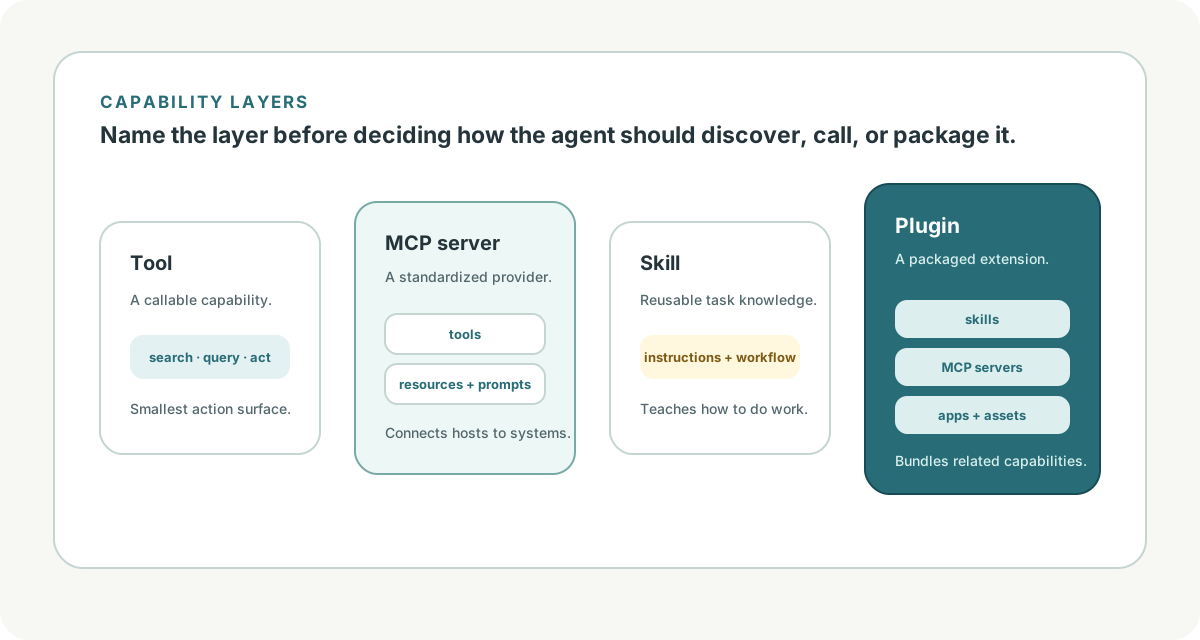
The stack looks like this:
tool: a callable capability
MCP server: a standardized provider of tools/resources/prompts
skill: reusable task instructions and workflow knowledge
plugin: packaged extension that can include skills, tools, apps, and MCP servers
The Hitchhiker guide frames MCP as a way to reduce tool-integration fragmentation: instead of every host integrating separately with every external system, MCP moves the ecosystem toward reusable servers and clients [6].
Level 2: Concepts
The first design choice is to classify tools by consequence.
| Tool Type | Example | Risk Profile |
|---|---|---|
| Read-only data | search docs, inspect file, list tickets | low to medium |
| Computation | run parser, convert file, calculate quote | medium |
| Environment action | edit file, run shell, browse website | medium to high |
| External side effect | send email, refund order, deploy service | high |
| Orchestration | call agent, spawn subtask, handoff | variable and compounding |
Tool descriptions should say what the tool does, what it does not do, and what the model should provide. Anthropic calls this "agent-computer interface" work: tool interfaces and documentation are part of the system design, not an afterthought [5].
MCP
MCP has three roles:
- host: the LLM application the user interacts with
- client: the component inside the host that connects to an MCP server
- server: the process or service that exposes capabilities
The specification includes tools, resources, prompts, roots, sampling, and elicitation as protocol capabilities [3]. In practical terms, this means an agent host can discover and call external capabilities through a shared protocol instead of a custom integration for every data source.
OpenAI's integrations docs describe both hosted MCP tools and SDK-managed MCP connections over stdio or streamable HTTP, with tracing to inspect what happened during a run [2]. That is the production pattern: protocol-based capability plus observability.
Skills
Skills are not the same as tools. A tool is called during execution. A skill tells the agent how to approach a class of tasks.
For example, a Markdown-to-HTML tool could convert a file. A Markdown-to-HTML skill says how to structure the article, what CSS expectations matter, how to handle references, how to verify the result, and which script to run.
Skills are useful when the agent needs:
- task-specific workflow memory
- local conventions
- reference files
- examples and templates
- validation steps
- constraints that should apply before tool use
Claude Code's docs describe related extension ideas such as CLAUDE.md, MCP, skills, hooks, and custom workflows [4]. The ecosystem vocabulary differs, but the architectural role is familiar: package reusable context and capability so the agent can do specialized work more reliably.
Codex App
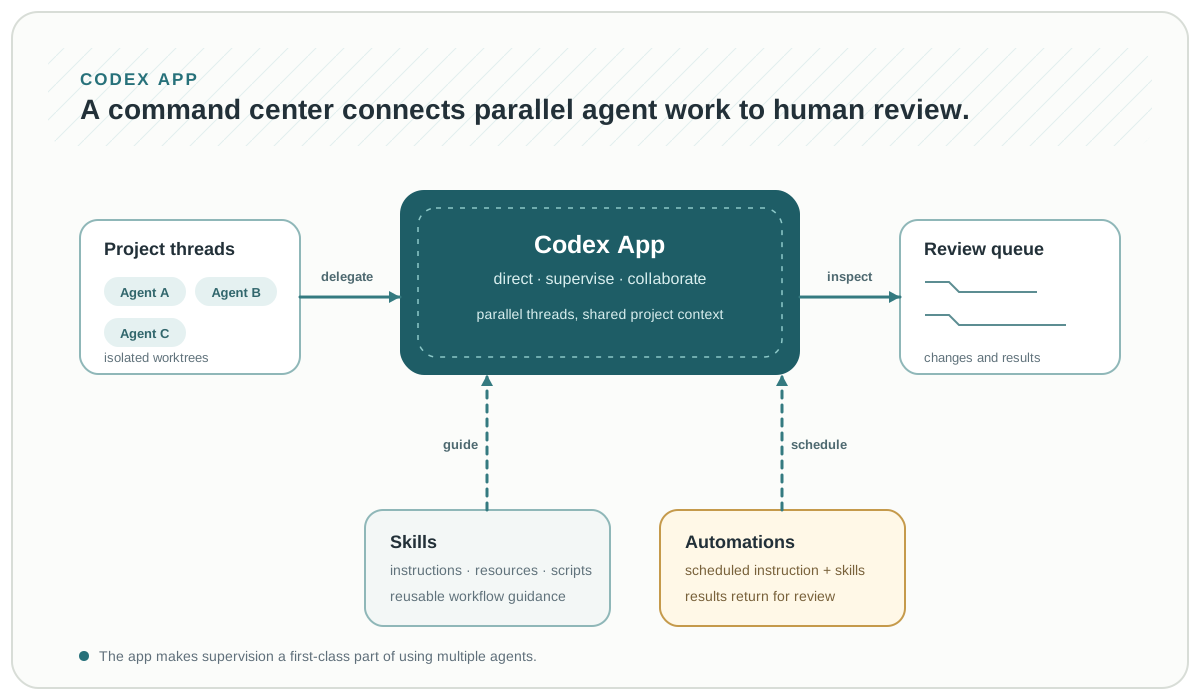
The Codex App is an operating surface for this capability stack, not just another place to type prompts. OpenAI describes it as a command center for managing multiple agents: work runs in separate project threads, changes can be reviewed in the thread, and built-in worktrees let agents work on isolated copies of a repository [7]. That changes the human role from completing one edit with one agent to directing, supervising, and reviewing a set of long-running tasks.
Skills make that command center extensible. In Codex, a skill bundles instructions, resources, and scripts so the agent can follow a reliable workflow; skills can be explicitly requested or selected for a relevant task. A skill created in the app can also be used in the CLI and IDE extension, and teams can check skills into a repository to share their working conventions [7].
The app also supports scheduled Automations: instructions with optional skills that run in the background and return their results to a review queue. Treat this as a supervision loop, not unattended authority. A useful automation has a bounded task, low-risk tools, observable outputs, and a clear person or policy that reviews consequential results [7].
The app's default sandbox reinforces that distinction: agents are limited to the folder or branch where they work and cached web search, and elevated actions such as network access require permission unless a project or team has configured a rule for them [7]. Configuration can reduce repeated friction, but it should follow an explicit review of the command and its scope.
Plugins
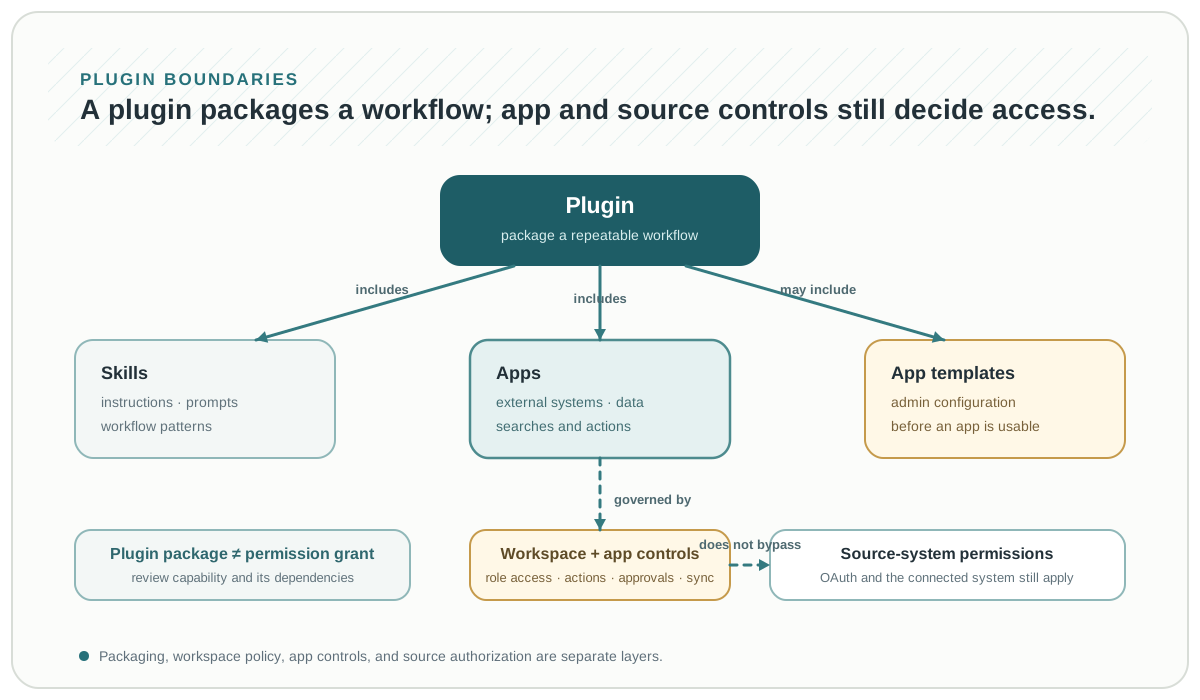
Plugins are packaging. They are useful when a capability needs to be discovered, installed, enabled, versioned, or shared. In the current ChatGPT and Codex product model, the Plugin Directory is the primary place to discover workflow capabilities. A plugin is a workflow package that can include skills, apps, and app templates [8].
A plugin can bring together:
- one or more skills
- apps that connect to approved tools, data, or actions
- app templates that an administrator must configure before the underlying app can be used
That structure is deliberately layered. The plugin supplies a coherent workflow; an included app supplies the integration to an external system. Plugin availability is not the same as app permission: workspace and app settings control which roles can use an app, whether it can read or take actions, whether actions require confirmation, and which data can be synced. The connected source system's own permissions still apply [8].
For an app-backed plugin, a safe rollout is a small operational sequence:
- Review the plugin's skills, included apps, setup requirements, connection requirements, and privacy terms.
- Configure the required app or app template, assign the smallest appropriate role scope, and begin with read-only access when possible.
- Require OAuth or other provider authentication where needed; test with a low-risk prompt before enabling writes.
- Review action controls, approvals, sync boundaries, and source-system access separately from the plugin's installation policy.
- Revisit access and controls after the workflow is in use, especially when the plugin or its dependencies are refreshed [8].
The danger is treating plugin installation as trust. A plugin is supply chain: it can influence how an agent works through skills and expand what it can reach through apps. Review provenance, dependencies, permissions, version changes, and the real side effects of the underlying apps.
Level 3: Engineering Detail
A good tool is narrow, typed, permissioned, observable, and recoverable.
Tool Schema
{
  "name": "lookup_invoice",
  "description": "Read invoice metadata for a customer account. This tool does not modify billing state.",
  "input_schema": {
    "type": "object",
    "required": ["customer_id", "invoice_id"],
    "properties": {
      "customer_id": {"type": "string"},
      "invoice_id": {"type": "string"}
    },
    "additionalProperties": false
  },
  "permission": "read_customer_billing",
  "side_effects": "none",
  "timeout_ms": 5000,
  "returns": {
    "invoice_status": "string",
    "amount_cents": "integer",
    "due_date": "string"
  }
}
The model-visible description should be precise. The machine-visible schema should be strict. The runtime should enforce the permission.
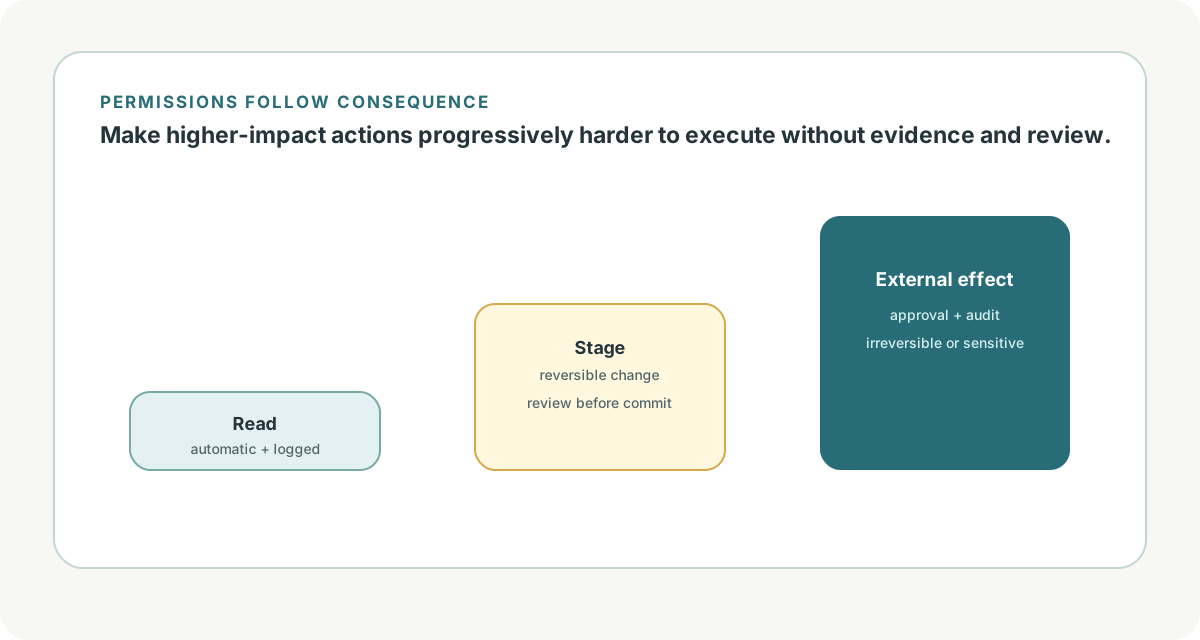
Tool Permission Tiers
| Tier | Examples | Runtime Behavior |
|---|---|---|
| free read | local docs search, current time | allow and log |
| scoped read | customer lookup, internal search | check identity and ACL |
| reversible write | draft note, stage patch | allow in sandbox or require confirmation |
| irreversible write | deploy, email, refund | require approval and audit |
| privileged execution | shell, browser, database mutation | sandbox, allowlist, approval, tracing |
The model can request a tool call. The runtime decides whether it happens.
MCP Server Checklist
Before adding an MCP server, ask:
- what tools, resources, and prompts does it expose?
- are tool descriptions stable and accurate?
- does it require user secrets or service credentials?
- can it enforce tenant/user permissions?
- what logs will it emit?
- can tool outputs contain untrusted instructions?
- how does the host revoke access?
- how are versions pinned?
Because MCP standardizes connectivity, it also makes capability easier to spread. That is good for interoperability and serious for risk management.
Skill Design Checklist
Skills should be specific enough to guide behavior but small enough to apply.
skill/
  SKILL.md
  references/
  scripts/
  templates/
  examples/
Good skills include:
- trigger conditions
- task workflow
- required references
- local constraints
- validation commands
- output expectations
- examples of good results
Bad skills are either too vague to help or so broad that they become a second operating manual.
Current Landscape
Tool ecosystems are moving toward standardization.
OpenAI supports built-in tools, function calling, tool search, file search, web search, and remote MCP tools [1]. Its integration docs position MCP-backed capabilities as part of an inspectable agent runtime with tracing [2].
MCP has become the clearest protocol boundary for agent-to-tool integration [3]. It does not solve every problem. It does not decide whether a tool is safe, whether a user is authorized, or whether a tool result is trustworthy. It does give hosts and tool providers a shared language.
Skills and plugins are the workflow and packaging layers. They matter because agents need more than callable APIs: they need task procedures, examples, local norms, validation habits, installed capabilities, and an operating surface for review. The Codex App combines parallel project threads, skills, Automations, and review into that operating layer [7].
For Codex and ChatGPT workspaces, plugins now package workflow guidance with apps and app templates. This makes discovery easier, but it does not collapse the trust model: workspace policy, each app's controls, and the connected source system still govern access [8].
The Hitchhiker guide's N-to-M integration framing is a useful mental model: protocols and packaged capabilities reduce repeated glue code, but they increase the importance of trust, discovery, and governance [6].
Practical Takeaways
Design tools like APIs, not like shortcuts. Give them strict schemas, clear descriptions, timeout behavior, and explicit side-effect labels.
Separate data tools from action tools. Reading and writing should not share the same permission model.
Use MCP when interoperability matters. It is especially valuable when many hosts need access to many external systems.
Treat skills as workflow knowledge. A skill should teach the agent how to do a task, not just expose another function.
Use the Codex App to supervise parallel work deliberately. Isolate concurrent changes, give agents bounded goals, and review results before consequential follow-on actions.
Treat plugins as supply chain and as dependency bundles. Review their skills, apps, setup requirements, permissions, action controls, and source-system boundaries; installing a plugin does not grant data access by itself.
Log every meaningful tool call. Agent debugging depends on knowing what the model requested, what the runtime allowed, and what the world returned.
References
[1] "Using tools." OpenAI API documentation. https://developers.openai.com/api/docs/guides/tools. Published/updated: not listed. Accessed: 2026-07-06. Used for: built-in tools, function calling, file search, web search, tool search, remote MCP, and custom functions.
[2] "Integrations and observability." OpenAI API documentation. https://developers.openai.com/api/docs/guides/agents/integrations-observability. Published/updated: not listed. Accessed: 2026-07-06. Used for: MCP-backed capabilities, SDK-managed MCP connections, hosted tools, and tracing.
[3] "Model Context Protocol specification, 2025-06-18." Model Context Protocol. https://modelcontextprotocol.io/specification/2025-06-18. Published/updated: 2025-06-18. Accessed: 2026-07-06. Used for: MCP purpose, JSON-RPC 2.0, host/client/server roles, tools, resources, prompts, roots, sampling, and elicitation.
[4] "Claude Code overview." Anthropic Claude Code documentation. https://code.claude.com/docs/en/overview. Published/updated: not listed. Accessed: 2026-07-06. Used for: coding-agent extension surfaces including MCP, instruction files, skills, hooks, and workflows.
[5] "Building effective agents." Anthropic. https://www.anthropic.com/engineering/building-effective-agents. Published/updated: 2024-12-19. Accessed: 2026-07-06. Used for: agent-computer interface framing, tool documentation, and start-simple guidance.
[6] "The Hitchhiker's Guide to Agentic AI: From Foundations to Systems." Haggai Roitman. Local source: agent-101/The Hitchhiker’s Guide to Agentic AI/book.tex. Published/updated: 2026. Accessed: 2026-07-06. Used for: MCP integration-fragmentation framing, host/client/server roles, transports, and tool capability packaging.
[7] "Introducing the Codex app." OpenAI. Published: 2026-02-02; updated: 2026-03-04. Accessed: 2026-07-13. https://openai.com/index/introducing-the-codex-app/. Used for: Codex App multi-agent threads and worktrees, skills, Automations, review queue, and default sandboxing.
[8] "Plugins in ChatGPT and Codex." OpenAI Help Center. Updated: 2026-07-12. Accessed: 2026-07-13. https://help.openai.com/en/articles/20001256-plugins-in-chatgpt-and-codex. Used for: the Plugin Directory; plugin composition; apps, app templates, installation, role access, action controls, OAuth, source-system permissions, and rollout guidance.
Enjoy Reading This Article?
Here are some more articles you might like to read next: