AI Agents 101 | 12. Agentic UX
Agentic UX
Agentic UX is not chat with a prettier input box.
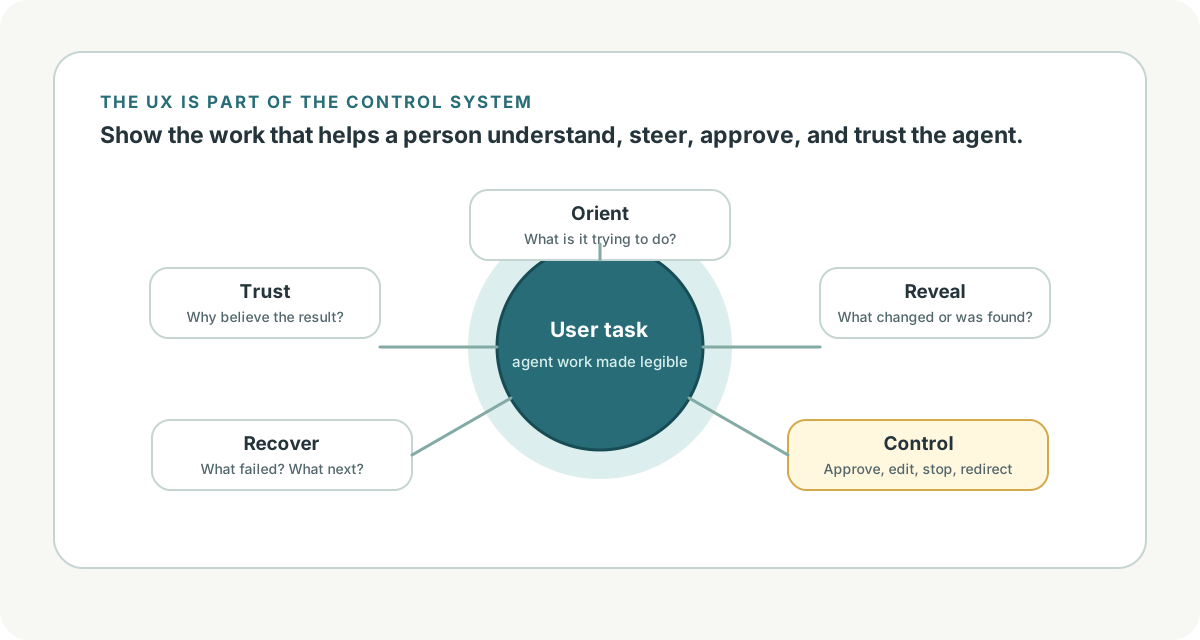
An agentic interface has to show what the agent is doing, what it knows, what it is allowed to do, where it is uncertain, what needs approval, and how the user can correct or steer it. The user experience is part of the control system.
If the runtime is the engine, the UX is the cockpit.
Level 1: Fundamentals
OpenAI's ChatKit docs describe embeddable chat experiences with widgets, prompts, tool invocation, file attachments, and visualizations of reasoning chains or work progress [1]. OpenAI's Apps SDK UX principles make the product point sharper: good apps fit conversational interaction, extract the core job, and avoid porting an entire website into chat [2].
That principle matters for agents. The UI should not expose every internal step. It should expose the steps the user needs to understand, approve, correct, or trust.
OpenAI's Apps SDK UI guidelines describe apps appearing through cards, carousels, and fullscreen views, with accessible components and display modes suited to the task [3]. For agentic UX, display mode should follow the work:
- inline card for a small result
- table for comparable structured data
- diff for code or document edits
- timeline for long-running tasks
- modal or approval panel for risky actions
- fullscreen workspace for complex multi-step work
The Hitchhiker guide treats agentic UI as part of the larger system stack, not a thin skin over the model [6].
Level 2: Concepts
Agentic UX has five recurring jobs.
| UX Job | User Question |
|---|---|
| Orient | What is the agent trying to do? |
| Reveal | What has it found or changed? |
| Control | What can I approve, reject, edit, or stop? |
| Recover | What went wrong and what can happen next? |
| Trust | Why should I believe this result? |
Progress
Long-running agents need progress that is honest but not noisy.
Good progress:
Searching policy docs...
Found 4 relevant sources.
Checking account eligibility...
Drafting response for approval...
Bad progress:
Thinking...
Still thinking...
Doing magic...
Streaming helps with responsiveness, but agentic progress should usually be event-based: tool started, source found, approval needed, artifact created, run paused, run completed.
Approval
Approvals are UX, not only backend state.
OpenAI's results/state and guardrails docs describe interruptions and human review as part of a run's state [4][5]. The UI should show:
- the exact proposed action
- the reason approval is needed
- the evidence supporting it
- what will happen if approved
- what will happen if rejected
- edit options when appropriate
Never ask the user to approve a vague action like "continue." Ask them to approve "send this email to this recipient" or "apply this patch to these files."
Corrections
Users need lightweight correction paths:
- edit a draft
- remove a source
- change an assumption
- reject a plan
- ask for a narrower answer
- stop a run
- escalate to a person
The best agentic UX lets the user steer without restarting the entire task.
Evidence
Trust is not a feeling the interface can demand. It is something the interface can support.
Show citations, source freshness, tool results, diffs, tests, and warnings at the point where the user needs them. Do not bury evidence at the bottom if the user is approving an action in the middle.
Level 3: Engineering Detail
Agentic UX works best when the runtime emits UI-friendly events.
UI Event Schema
{
  "run_id": "run_123",
  "event_id": "evt_456",
  "type": "approval_required",
  "title": "Approve customer email",
  "summary": "The agent drafted a refund-denial email based on policy section 3.",
  "payload": {
    "recipient": "customer@example.com",
    "draft_id": "draft_789",
    "citations": ["refund_policy_2026_04#section-3"],
    "risk_tier": 3
  },
  "actions": ["approve", "edit", "reject"]
}
The UI should not scrape model prose to know that approval is required. The runtime should emit a typed event.
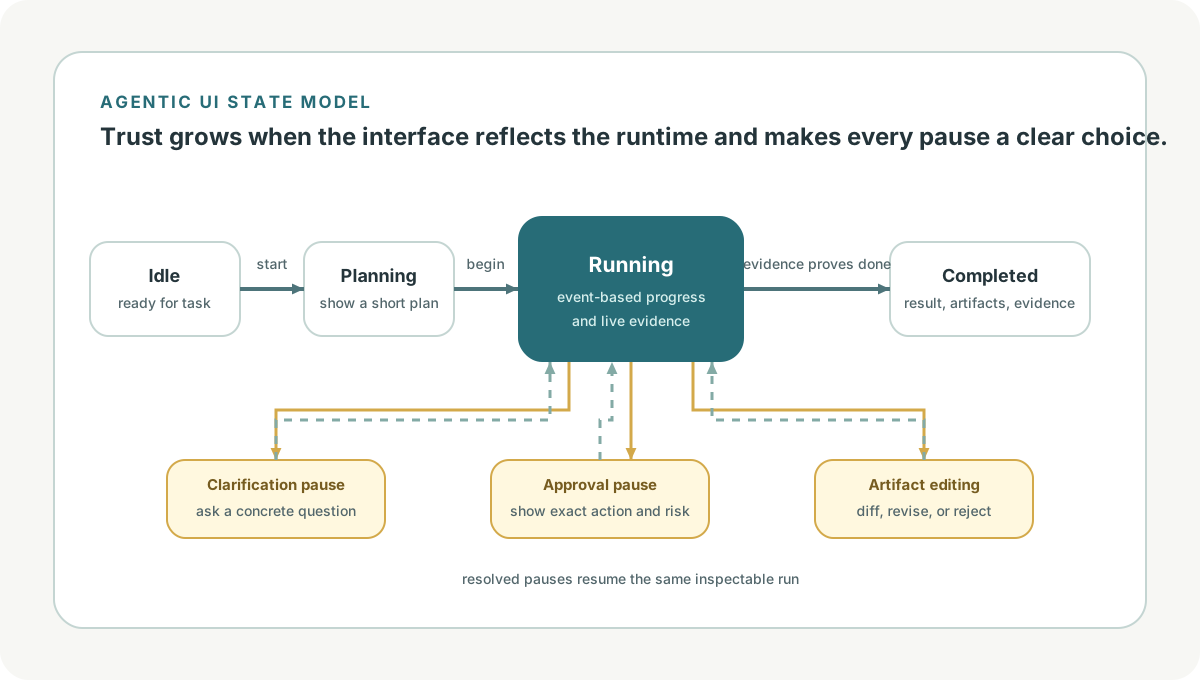
Agentic UI States
| State | UI Behavior |
|---|---|
| idle | ready for task input |
| planning | show short plan if useful |
| running | show event-based progress |
| waiting_for_user | ask a concrete question |
| waiting_for_approval | show exact action and controls |
| editing_artifact | show diff or structured editor |
| failed | explain recoverable next steps |
| completed | show result, evidence, and artifacts |
These states should map to runtime state. If UI state and backend state drift apart, users lose trust quickly.
Display Patterns
| Work Type | Best UI Pattern |
|---|---|
| answer with citations | text plus source list |
| data comparison | sortable table |
| code change | file tree plus diff |
| long research | timeline plus artifacts |
| support action | case summary plus approval panel |
| multi-step workflow | stepper or run timeline |
| uncertainty | explicit caveat plus next action |
Do not force every result into chat bubbles. Agents create artifacts, and artifacts deserve appropriate surfaces.
Error Recovery
Good agentic UX turns failure into a choice.
The policy search timed out.

Options:
- retry the search
- continue with the sources already found
- narrow the request
- escalate to a human
This is better than "something went wrong" because it preserves user agency.
Current Landscape
Agent UI is moving from chatbot to workspace.
ChatKit points toward embedded chat plus tools, widgets, files, prompts, and work visualization [1]. Apps SDK guidance emphasizes that applications inside conversational surfaces should use conversation where it adds leverage, extract the core task, and compose with the surrounding product instead of trying to replicate a whole site [2][3].
The runtime docs matter for UX too. Interruptions, resumable state, and human-review approvals are backend concepts, but they become visible user moments [4][5].
The Hitchhiker guide is helpful because it places agentic UI after the rest of the stack: UI must reflect tools, memory, protocols, orchestration, evaluation, and safety [6].
Practical Takeaways
Design the interface around the job, not around chat bubbles.
Expose progress as meaningful events. The user should know whether the agent is searching, editing, waiting, blocked, or done.
Make approvals concrete. Show the exact action, evidence, risk, and available choices.
Use the right surface for artifacts: tables, diffs, timelines, cards, and fullscreen workspaces all have a place.
Let users steer and recover. Correction paths should be first-class, not a restart button.
Connect UI states to runtime states. Agentic UX is reliable only when the backend emits structured events the interface can trust.
References
[1] "ChatKit." OpenAI API documentation. https://developers.openai.com/api/docs/guides/chatkit. Published/updated: not listed. Accessed: 2026-07-06. Used for: embeddable chat, widgets, prompts, tool invocation, file attachments, and work visualizations.
[2] "UX principles." OpenAI Apps SDK documentation. https://developers.openai.com/apps-sdk/concepts/ux-principles. Published/updated: not listed. Accessed: 2026-07-06. Used for: conversational fit, core-job extraction, native fit, composability, and avoiding full-site ports into chat.
[3] "UI guidelines." OpenAI Apps SDK documentation. https://developers.openai.com/apps-sdk/concepts/ui-guidelines. Published/updated: not listed. Accessed: 2026-07-06. Used for: cards, carousels, fullscreen views, accessible components, display modes, and structured UI surfaces.
[4] "Results and state." OpenAI API documentation. https://developers.openai.com/api/docs/guides/agents/results. Published/updated: not listed. Accessed: 2026-07-06. Used for: final output, history, interruptions, resumable state, and pending approvals.
[5] "Guardrails and human review." OpenAI API documentation. https://developers.openai.com/api/docs/guides/agents/guardrails-approvals. Published/updated: not listed. Accessed: 2026-07-06. Used for: approval flows, human review, tool guardrails, and pauses.
[6] "The Hitchhiker's Guide to Agentic AI: From Foundations to Systems." Haggai Roitman. Local source: agent-101/The Hitchhiker’s Guide to Agentic AI/book.tex. Published/updated: 2026. Accessed: 2026-07-06. Used for: agentic UI as part of the agentic system stack and its relationship to tools, orchestration, safety, and evaluation.
Enjoy Reading This Article?
Here are some more articles you might like to read next: